clear all;
Exercise 1.3 - Find the DH parameters
In this exercise you will compute the DH parameters of an arbitrary robot manipulator, setup the equations using the symbolic toolbox and the define the robot using the robotic system toolbox.
Please store your solutions in the predefined variables!
Task description:
Find the DH parameters and homogeneous transforms to describe the following robot manipulator:
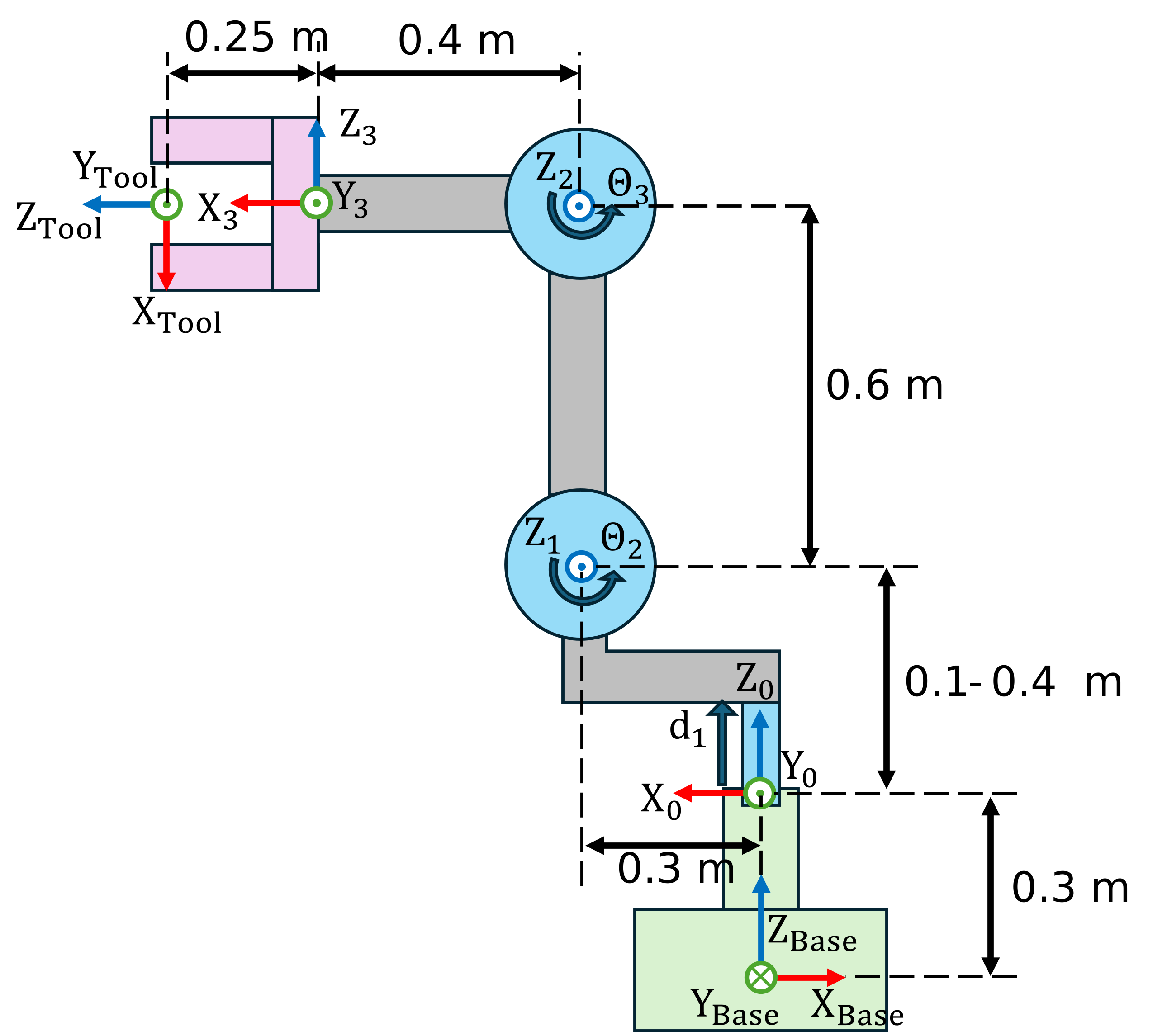
Answer all the questions and store your solution in the correct variable
Task 1
- Define real symbolic variables for each joint (q1, ..., qn)
- Store them in a column array (q)
- Define the position limits for each of the joints, for revolute joints the limit is \(\pm 2\pi \;\) (limit_1, ..., limit_n)
Use the following variables to store your solution:
- qi (joint position of joint i)
- q (an array with all the symbolic joint states)
- limit_i (array with minimum and maximum permitted joint value)
q=[];
limit_1=[];
You can check your work by clicking the Run:
check_exercise('1-3-1')
Task 2
- compute the DH parameters, include the symbolic joints in their correct position.
- Compute the homogeneous transform between the base and the first joint (TB0)
- Compute the homogeneous transform between the frame 3 and the tool frame (T4tool)
You can use the function dh2tf(DH) to get the homogeneous transform from a row of DH parameters.
Use the following variables to store your solution:
- DH (a , alpha, d, theta)
- TB0 (homogeneous transform from base to frame 0)
- T3tool
DH=[
   %a       alpha       d       theta

   ];
TB0 = [];
T3tool = [];
You can check your work by clicking the Run:
check_exercise('1-3-2')
Task 3
- Setup the robot using the Robotic System toolbox
- Define the data format as column
use the following names:
- body_base (body name for base offset)
- base_link (joint name for body_base)
- body_1, ..., body_n (bodies for joints)
- joint_1, ..., joint_n (robot joints)
- tool (body name of the tool)
- tool_link (joint name for tool body)
Use the following variables to store your solution:
- robot (name of your robot)
- bodies (cell array containing all bodies)
- joints (cell array containing all joints)
Note:
in order to use your previously setup DH parameters, you need to convert them to a double. Use the subs() function to substitute your symbolic variables into numeric ones. Remember that the toolbox will disregard any item in the controlled field (e.g. theta for revolute joints)
bodies = [];
joints = [];
robot = [];
You can check your work by clicking the Run:
check_exercise('1-3-3')
Task 4
- Set the home configuration so the robot matches the image (use the lower limit for the first joint)
- Set the joint limits
You can check your work by clicking the Run:
check_exercise('1-3-4')