clear all;
Structures in MATLAB
In this tutorial we will explain what MATLAB structures are and how to work with them.
Please enable "Output inline" on the right side of your scroll bar.

Create a Simple Structure
A structure is a data type that groups related data using named fields.
You can create one using direct assignment or with the struct function.
robot.name      = 'MyRobot';
robot.DOF       = 6;
robot.payload   = 2.5
robot = struct with fields:
       name: 'MyRobot'
        DOF: 6
    payload: 2.5000
Equivalent creation with struct()
robot2 = struct('name','MyRobot', ...
    'DOF',6, ...
    'payload',2.5)
robot2 = struct with fields:
       name: 'MyRobot'
        DOF: 6
    payload: 2.5000
Nested Structures
Structures can contain other structures, enabling hierarchical data.
robot2.links(1) = struct('length',0.5,'mass',4.0)
robot2 = struct with fields:
       name: 'MyRobot'
        DOF: 6
    payload: 2.5000
      links: [1x1 struct]
robot2.links(2) = struct('length',0.4,'mass',3.5)
robot2 = struct with fields:
       name: 'MyRobot'
        DOF: 6
    payload: 2.5000
      links: [1x2 struct]
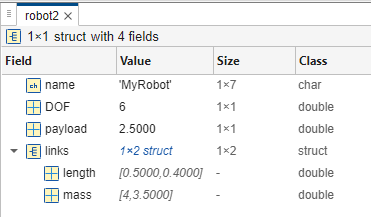
Accessing Fields
Fields are accessed with dot notation: StructureName.FieldName
Read a field
robotName=robot.name
robotName = 'MyRobot'
Write/update a field
robot.payload = 3.0
robot = struct with fields:
       name: 'MyRobot'
        DOF: 6
    payload: 3
Access nested field
link1_length = robot2.links(1).length
link1_length = 0.5000
robot2.links(2).length = 0.8;
Dynamic Field Names
You can add or access fields with variable names using parentheses.
newfield = 'maxSpeed';
robot.(newfield) = 1.2;               % adds a new field maxSpeed
Check existence before access
if isfield(robot, newfield)
    RobotMaxSpeed = robot.maxSpeed
end
RobotMaxSpeed = 1.2000
Adding and Removing Fields
Use setfield and rmfield, or direct manipulation.
Add a field
robot = setfield(robot, 'manufacturer', 'UniversalRobots')
robot = struct with fields:
            name: 'MyRobot'
             DOF: 6
         payload: 3
        maxSpeed: 1.2000
    manufacturer: 'UniversalRobots'
Remove a field
robot = rmfield(robot, 'manufacturer')
robot = struct with fields:
        name: 'MyRobot'
         DOF: 6
     payload: 3
    maxSpeed: 1.2000