Exercise 2.1 - Forward Kinematics
In this exercise you will setup the forward kinematics equations for different robot manipulators.
Please store your solutions in the predefined variables!
Task description:
Find the DH parameters and setup the forward kinematics for the shown structure.
Answer all the questions and store your solution in the correct variable
Task 1
Given this Spherical Wrist setup. 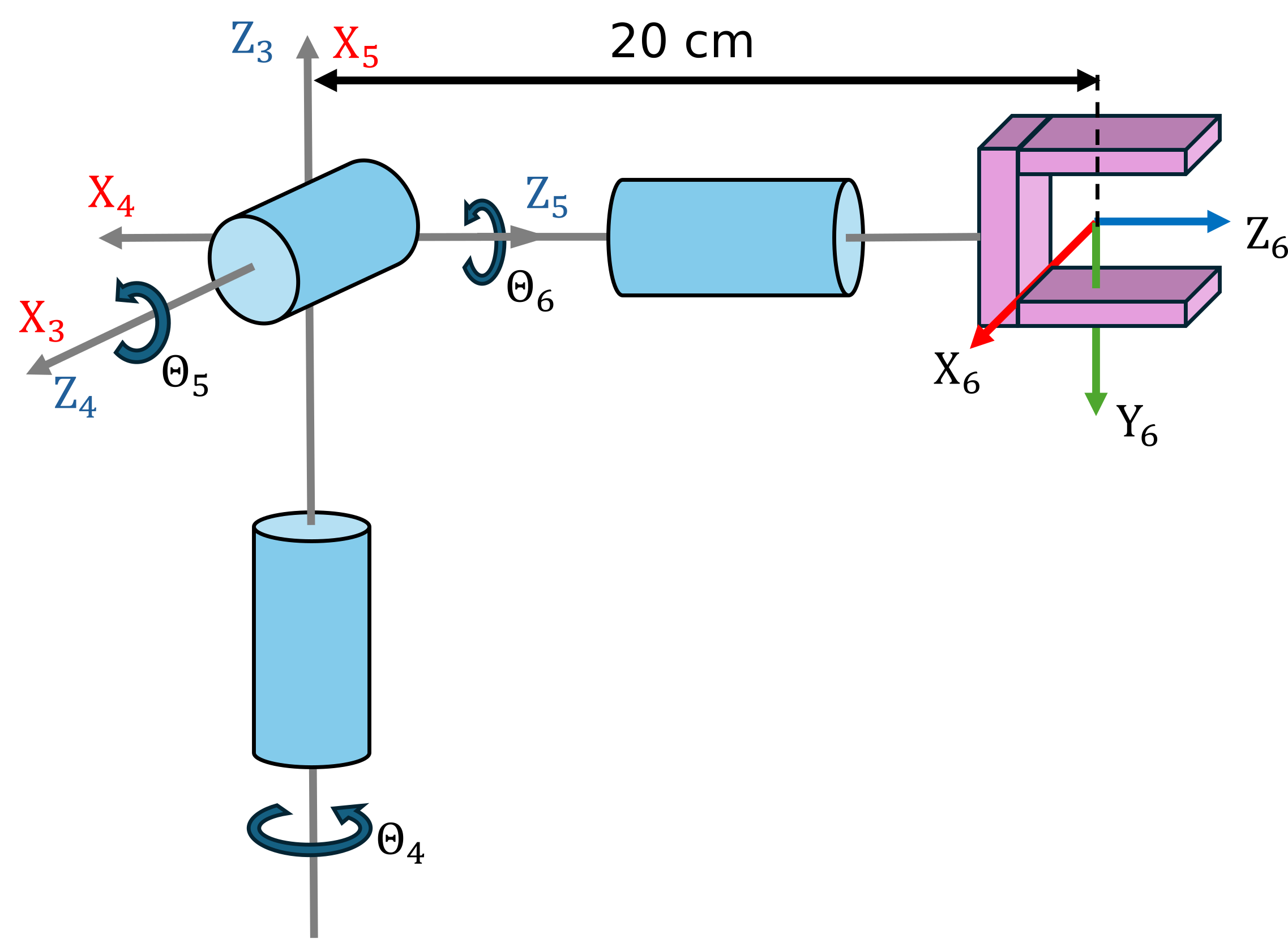
- Find the DH parameters and setup the Forward Kinematics matrix.
Use the following variables to store your solution:
- q4 ... q6 (Real Symbolic variable for the Joint angle Theta 4-6)
- q (vector containing the symbolic Joint angles)
- A36 (Forward Kinematic Equation)
clear all;
q = [];
A36= [];
You can check your work by clicking the Run:
check_exercise('2-1-1')
Checking exercise 2-1-1: Checking forward kinematic

Checking variables:

Checking Variable A36
[OK] A36 is of type sym

Checking Variable q4
[OK] q4 is of type sym

Checking Variable q5
[OK] q5 is of type sym

Checking Variable q6
[OK] q6 is of type sym

Checking if variables are real
[OK] variables are setup correctly

Checking Variable q
[OK] q is of type sym

Checking dimension of q
[OK] correct dimensions of q

Checking A36 matrix
[OK] Forward Kinematics matches solution
Task 2
- Find the forward kinematics for the joint configuration [0, 0, 0]
- Find the forward kinematics for the joint configuration [pi/2, 0 , pi/7]
Use the following variables to store your solution:
- T_1 (Homogeneous Transform for joint configuration [0, 0, 0])
- T_2 (Homogeneous Transform for joint configuration [pi/2, 0 , pi/7])
T_1 = [];
T_2 = [];
You can check your work by clicking the Run:
check_exercise('2-1-2')
Checking exercise 2-1-2: Tranform matrices

Checking variables:

Checking Variable T_1
[OK] T_1 is of type double
[OK] T_1 correct

Checking Variable T_2
[OK] T_2 is of type double
[OK] T_2 correct
Task 3
- Setup the Wrist using the Robotic System toolbox with the Dataformat "column"
- Define the data format as column
use the following names:
- spherical_wrist (name of the robot)
- world (name of the robot base)
- wrist_1_link ... wrist_3_link (body name of the wrist links)
- wrist_1_joint ... wrist_3_joint (joint names of the wrist)
spherical_wrist =[];
You can check your work by clicking the Run:
check_exercise('2-1-3')
Checking exercise 2-1-3: spherical_wrist Structure

Checking variables:

Checking Variable spherical_wrist
[OK] spherical_wrist is of type rigidBodyTree

Checking spherical_wrist data format
[OK] Correct data format

Checking Variable bodies
[OK] bodies is of type cell

Number of bodies
[OK] correct number of bodies

Checking Variable joints
[OK] joints is of type cell

Number of joints
[OK] correct number of joints

Checking joint type
[OK] spherical_wrist.Bodies{1}.Joint.Type matches expected value

Checking joint type
[OK] spherical_wrist.Bodies{2}.Joint.Type matches expected value

Checking joint type
[OK] spherical_wrist.Bodies{3}.Joint.Type matches expected value

Checking base name
[OK] spherical_wrist.BaseName matches expected value

Checking if DH parameters are correct
[OK] DH parameters correctly linked to joints

Checking body and joint names
[OK] Bodies named correctly
[OK] Joints named correctly
Task 4
- Obtain the Transform for the Joint Configuration [0,-pi/2,-pi/2] from the baseframe to the last wrist frame.
Use the following variables to store your solution:
- T_config (Transform for the Joint Configuration [0,-pi/2,-pi/2])
T_config =[];
You can check your work by clicking the Run:
check_exercise('2-1-4')
Checking exercise 2-1-4: Checking Tranform matrices

Checking variables:

Checking Variable T_config
[OK] T_config is of type double
[ERROR] Comparison failed for T_config: Arrays have incompatible sizes for this operation.
Task 5
- Using the Robotic System toolbox load a UR10e model
- Obtain the transform from the base frame to the first wrist link for the configuration [0,0,0,0,0,0]
- Obtain the transform from the base frame to the tool0 frame for the configuration [0, -pi/2, 0, -pi/2, 0, 0]
Use the following variables to store your solution:
- ur10e (Name of the robot)
- TBW1 (Homogeneous Transform Base to first wrist)
- TBT (Homogeneous Transform from Base to tool0)
TBW1 = [];
TBT = [];
You can check your work by clicking the Run:
check_exercise('2-1-5')