clear all;
Exercise 1.1 - Find the Transforms
In this exercise you will need to find transforms between coordinate frames.
Please store your solutions in the predefined variables!
Task description:
given this set of Coordinate frames:
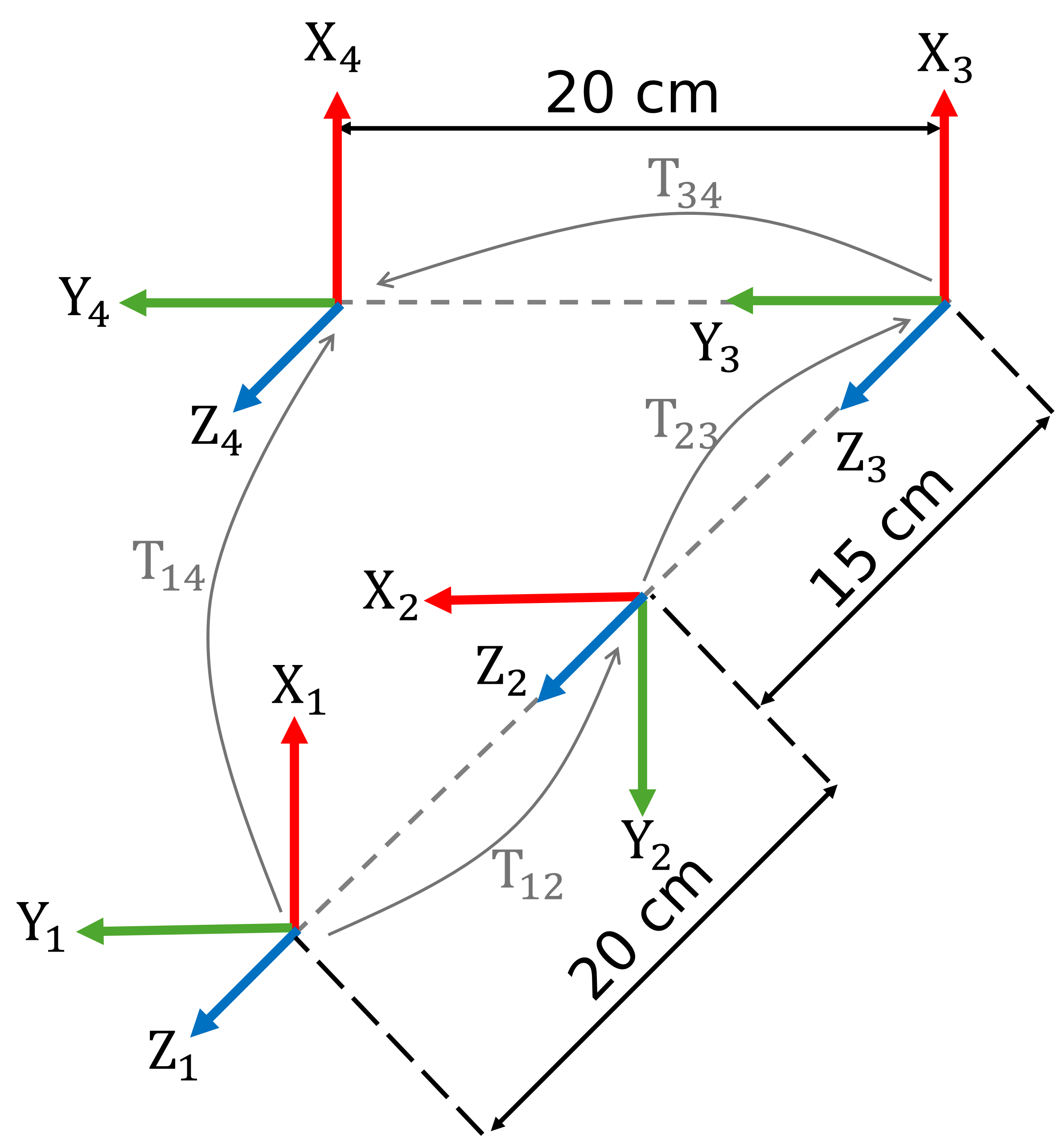
Answer all the questions and store your solution in the correct variable
Task 1
- Find the homogeneous transforms between frames 1 and 2
- Find the homogeneous transforms between frames 2 and 3
- Find the homogeneous transforms between frames 3 and 4
Use the following variables to store your solution:
- T12 (homogeneous transform from frame 1 to frame 2)
- T23 (homogeneous transform from frame 2 to frame 3)
- T34 (homogeneous transform from frame 3 to frame 4)
T12 = [];
T23 = [];
T34 = [];
You can check your work by clicking the Run:
check_exercise('1-1-1')
Checking exercise 1-1-1: Check a homogeneous transformation matrix

Checking variables:

Checking Variable T12
[OK] T12 is of type double
[OK] T12 correct

Checking Variable T23
[OK] T23 is of type double
[OK] T23 correct

Checking Variable T34
[OK] T34 is of type double
[OK] T34 correct
Task 2
- Find the homogeneous transform between frame 1 and frame 4.
- Find the origin of frame 4 w.r.t. frame 1.
Use the following variables to store your solution:
- T14 (homogeneous transform from frame 1 to frame 4)
- origin14 (vector containing xyz coordinates)
T14 = [];
origin14 = [];
You can check your work by clicking the Run:
check_exercise('1-1-2')
Checking exercise 1-1-2: Check transform and position of origin

Checking variables:

Checking Variable T14
[OK] T14 is of type double
[OK] T14 correct

Checking Variable origin14
[OK] origin14 is of type double
[OK] origin14 correct
Task 3
- Find the homogeneous transform from frame 4 to frame 1.
- Give the origin of frame 1 w.r.t. frame 4.
Use the following variables to store your solution:
- T41 (homogeneous transform from frame 4 to frame 1)
- origin41 (vector containing xyz coordinates)
T41 = [];
origin41 = [];
You can check your work by clicking the Run:
check_exercise('1-1-3')
Checking exercise 1-2: Check a homogeneous transformation matrix

Checking variable structure:
[FAIL] TB0 not found in workspace
[FAIL] TB1 not found in workspace

 Running 1 functional test(s):

Test 1: Checking Transform TB0
Task 4
Calibrate the Camera and find the location of the object w.r.t. the world frame.
Look at the following setup:
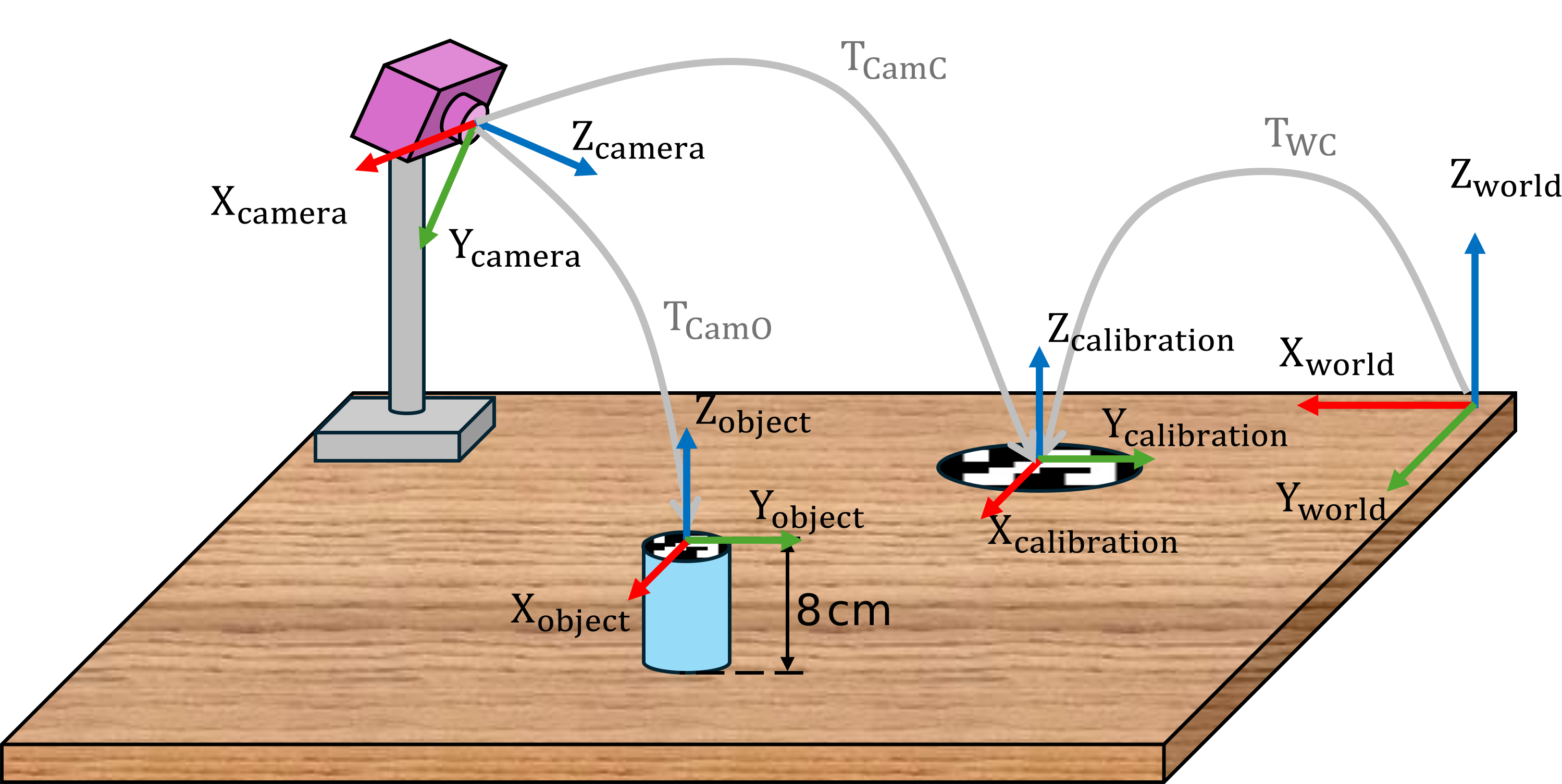
To calibrate the camera we want to locate it w.r.t. the world frame.
You know that the relative position and orientation from the world frame to the calibration marker is:
$$ T_{\textrm{WC}} =\left\lbrack \begin{array}{cccc} 0 & -1 & 0 & 0\ldotp 14\newline 1 & 0 & 0 & 0\ldotp 25\newline 0 & 0 & 1 & 0\newline 0 & 0 & 0 & 1 \end{array}\right\rbrack $$
From the camera image you can obtain the relative position between the camera and the calibration marker:
$$ T_{\textrm{CamC}} =\left\lbrack \begin{array}{cccc} 0\ldotp 9397 & -0\ldotp 2620 & 0\ldotp 2198 & -0\ldotp 3237\newline 1 & -0\ldotp 6428 & -0\ldotp 766 & 0\ldotp 4655\newline 0\ldotp 342 & 0\ldotp 7198 & -0\ldotp 604 & 0\ldotp 4507\newline 0 & 0 & 0 & 1 \end{array}\right\rbrack $$
From the camera image you can also obtain the relative position between the camera and the desired object:
$$ T_{\textrm{CamO}} =\left\lbrack \begin{array}{cccc} 0\ldotp 9397 & -0\ldotp 2620 & 0\ldotp 2198 & -0\ldotp 0893\newline 1 & -0\ldotp 6428 & -0\ldotp 766 & 0\ldotp 4749\newline 0\ldotp 342 & 0\ldotp 7198 & -0\ldotp 604 & 0\ldotp 3916\newline 0 & 0 & 0 & 1 \end{array}\right\rbrack $$
- Find the Transform between the World and the Camera
- Find the transform between the World and the Object
Use the following variables to store your solution:
- TWCam (homogeneous transform from the world frame to camera frame)
- TWO (homogeneous transform from World to Object)
TWC = [
    0  -1   0   0.14;
    1   0   0   0.25;
    0   0   1   0 ;
    0   0   0   1];

TCamC = [
    0.9397    -0.2620     0.2198     -0.3237;
    0        -0.6428     -0.766    0.4655 ;
    0.342    0.7198         -0.604    0.4507 ;
    0        0             0        1];

TCamO = [
    0.9397    -0.2620     0.2198     -0.0893 ;
    0        -0.6428     -0.766    0.4749 ;
    0.342    0.7198         -0.604    0.3916;
    0        0             0        1];

TWCam = [];

TWO = [];
You can check your work by clicking the Run:
check_exercise('1-1-4')