clear all;
Exercici 2.1 - Cinemàtica directa
En aquest exercici configuraràs les equacions de cinemàtica directa per a diferents manipuladors robòtics.
Si us plau, desa les teves solucions a les variables predefinides!
Descripció de la tasca:
Troba els paràmetres DH i configura la cinemàtica directa per a l’estructura mostrada.
Respon totes les preguntes i desa la teva solució a la variable correcta
Tasca 1
Donada aquesta configuració de canell esfèric. 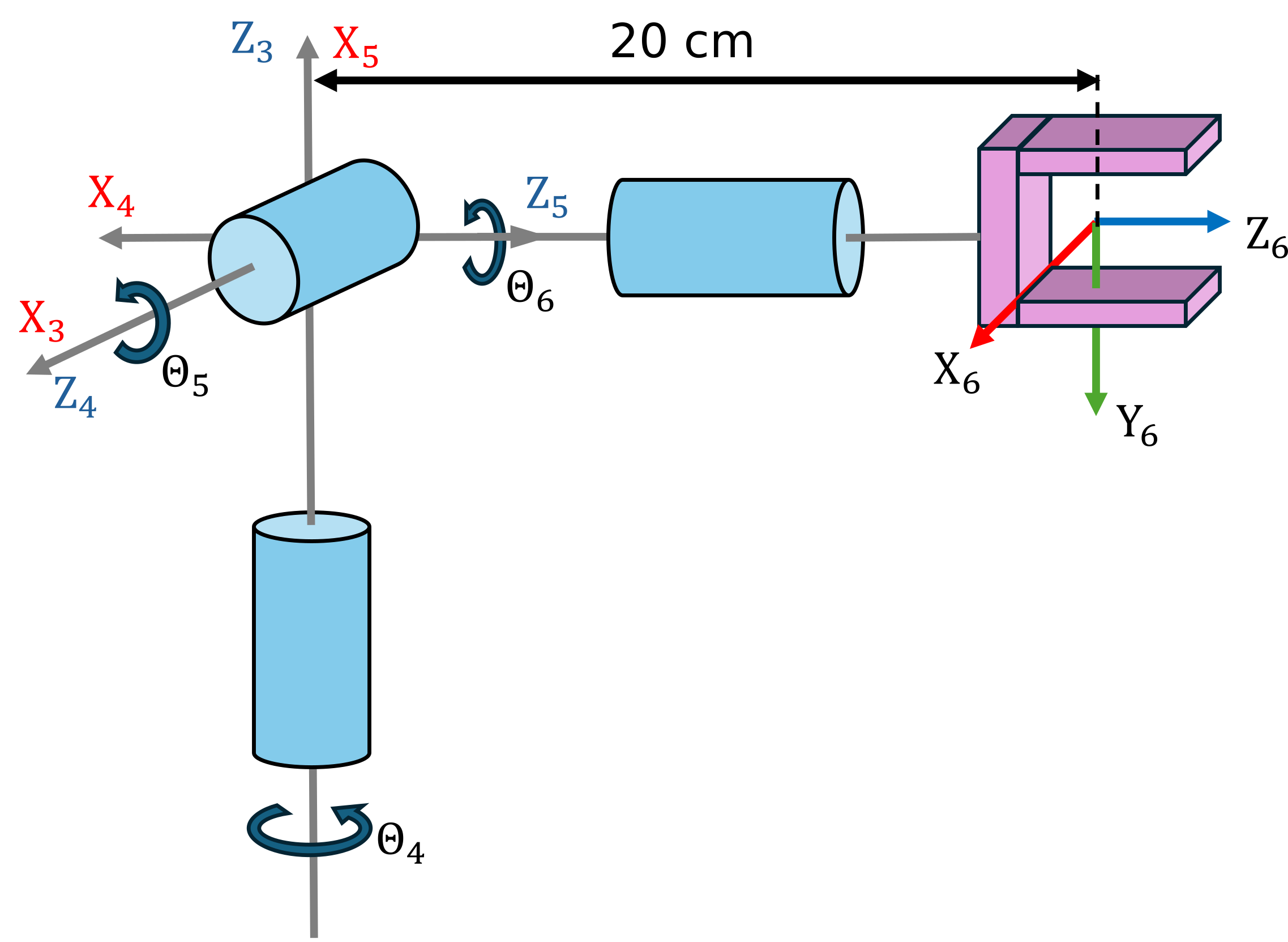
- Troba els paràmetres DH i configura la matriu de cinemàtica directa.
Fes servir les variables següents per desar la teva solució:
- q4 ... q6 (variable simbòlica real per a l’angle articular Theta 4-6)
- q (vector que conté els angles articulars simbòlics)
- A36 (equació de cinemàtica directa)
q = [];
A36= [];
Pots comprovar la teva feina fent clic a Run:
check_exercise('2-1-1')
Comprovant l’exercici 2-1-1: Comprovant la cinemàtica directa

Comprovant variables:

Comprovant la variable A36
[OK] A36 és de tipus sym

Comprovant la variable q4
[OK] q4 és de tipus sym

Comprovant la variable q5
[OK] q5 és de tipus sym

Comprovant la variable q6
[OK] q6 és de tipus sym

Comprovant si les variables són reals
[OK] les variables estan configurades correctament

Comprovant la variable q
[OK] q és de tipus sym

Comprovant la dimensió de q
[OK] dimensions correctes de q

Comprovant la matriu A36
[OK] La cinemàtica directa coincideix amb la solució
Tasca 2
- Troba la cinemàtica directa per a la configuració articular \(begin:math:display\)0\, 0\, 0\(end:math:display\)
- Troba la cinemàtica directa per a la configuració articular \(begin:math:display\)pi\/2\, 0 \, pi\/7\(end:math:display\)
Fes servir les variables següents per desar la teva solució:
- T_1 (transformació homogènia per a la configuració articular \(begin:math:display\)0\, 0\, 0\(end:math:display\))
- T_2 (transformació homogènia per a la configuració articular \(begin:math:display\)pi\/2\, 0 \, pi\/7\(end:math:display\))
T_1 = [];
T_2 = [];
Pots comprovar la teva feina fent clic a Run:
check_exercise('2-1-2')
Comprovant l’exercici 2-1-2: Matrius de transformació

Comprovant variables:

Comprovant la variable T_1
[OK] T_1 és de tipus double
[OK] T_1 correcta

Comprovant la variable T_2
[OK] T_2 és de tipus double
[OK] T_2 correcta
Tasca 3
- Configura el canell fent servir el Robotic System Toolbox amb el Dataformat "column"
- Defineix el format de dades com a column
fes servir els noms següents:
- spherical_wrist (nom del robot)
- world (nom de la base del robot)
- wrist_1_link ... wrist_3_link (nom del cos dels enllaços del canell)
- wrist_1_joint ... wrist_3_joint (noms de les articulacions del canell)
spherical_wrist =[];
Pots comprovar la teva feina fent clic a Run:
check_exercise('2-1-3')
Comprovant l’exercici 2-1-3: Estructura spherical_wrist

Comprovant variables:

Comprovant la variable spherical_wrist
[OK] spherical_wrist és de tipus rigidBodyTree

Comprovant el format de dades de spherical_wrist
[OK] Format de dades correcte

Comprovant la variable bodies
[OK] bodies és de tipus cell

Nombre de cossos
[OK] nombre correcte de cossos

Comprovant la variable joints
[OK] joints és de tipus cell

Nombre d’articulacions
[OK] nombre correcte d’articulacions

Comprovant el tipus d’articulació
[OK] spherical_wrist.Bodies{1}.Joint.Type coincideix amb el valor esperat

Comprovant el tipus d’articulació
[OK] spherical_wrist.Bodies{2}.Joint.Type coincideix amb el valor esperat

Comprovant el tipus d’articulació
[OK] spherical_wrist.Bodies{3}.Joint.Type coincideix amb el valor esperat

Comprovant el nom de la base
[OK] spherical_wrist.BaseName coincideix amb el valor esperat

Comprovant si els paràmetres DH són correctes
[OK] paràmetres DH enllaçats correctament amb les articulacions

Comprovant els noms dels cossos i de les articulacions
[OK] Cossos anomenats correctament
[OK] Articulacions anomenades correctament
Tasca 4
- Obtén la transformació per a la configuració articular \(begin:math:display\)0\,\-pi\/2\,\-pi\/2\(end:math:display\) des del marc de la base fins a l’últim marc del canell.
Fes servir les variables següents per desar la teva solució:
- T_config (transformació per a la configuració articular \(begin:math:display\)0\,\-pi\/2\,\-pi\/2\(end:math:display\))
T_config =[];
Pots comprovar la teva feina fent clic a Run:
check_exercise('2-1-4')
Comprovant l’exercici 2-1-4: Comprovant matrius de transformació

Comprovant variables:

Comprovant la variable T_config
[OK] T_config és de tipus double
[ERROR] La comparació ha fallat per a T_config: Els arrays tenen mides incompatibles per a aquesta operació.
Tasca 5
- Fent servir el Robotic System Toolbox, carrega un model UR10e
- Obtén la transformació des del marc de la base fins al primer enllaç del canell per a la configuració \(begin:math:display\)0\,0\,0\,0\,0\,0\(end:math:display\)
- Obtén la transformació des del marc de la base fins al marc tool0 per a la configuració \(begin:math:display\)0\, \-pi\/2\, 0\, \-pi\/2\, 0\, 0\(end:math:display\)
Fes servir les variables següents per desar la teva solució:
- ur10e (nom del robot)
- TBW1 (transformació homogènia de la base al primer canell)
- TBT (transformació homogènia de la base a tool0)
TBW1 = [];
TBT = [];
Pots comprovar la teva feina fent clic a Run:
check_exercise('2-1-5')