clear all;
Ejercicio 2.1 - Cinemática directa
En este ejercicio configurarás las ecuaciones de cinemática directa para diferentes manipuladores robóticos.
¡Guarda tus soluciones en las variables predefinidas!
Descripción de la tarea:
Encuentra los parámetros DH y configura la cinemática directa para la estructura mostrada.
Responde todas las preguntas y guarda tu solución en la variable correcta
Tarea 1
Dada esta configuración de muñeca esférica. 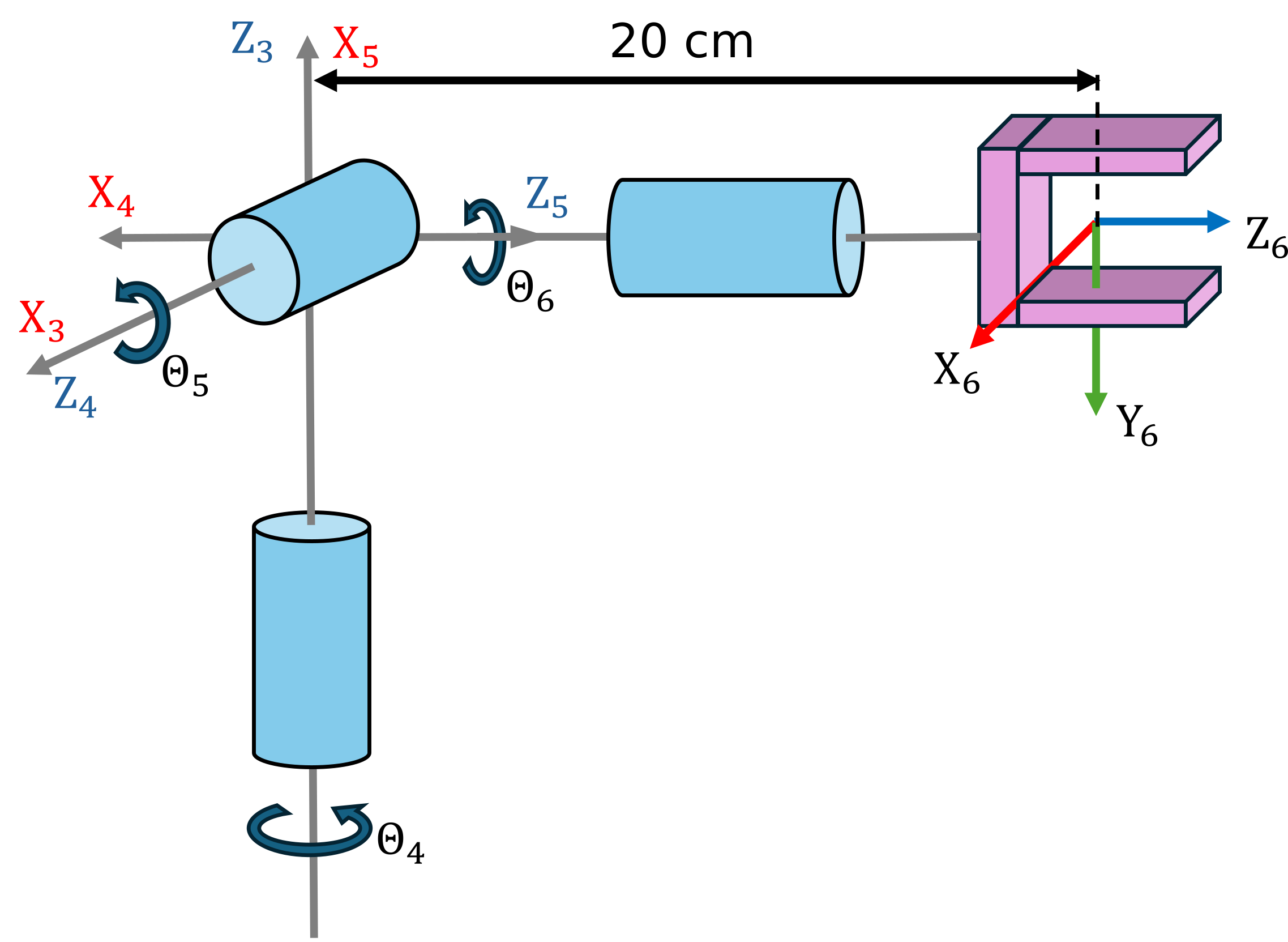
- Encuentra los parámetros DH y configura la matriz de cinemática directa.
Usa las siguientes variables para guardar tu solución:
- q4 ... q6 (variable simbólica real para el ángulo articular Theta 4-6)
- q (vector que contiene los ángulos articulares simbólicos)
- A36 (ecuación de cinemática directa)
q = [];
A36= [];
Puedes comprobar tu trabajo haciendo clic en Run:
check_exercise('2-1-1')
Checking exercise 2-1-1: Checking forward kinematic

Checking variables:

Checking Variable A36
[OK] A36 is of type sym

Checking Variable q4
[OK] q4 is of type sym

Checking Variable q5
[OK] q5 is of type sym

Checking Variable q6
[OK] q6 is of type sym

Checking if variables are real
[OK] variables are setup correctly

Checking Variable q
[OK] q is of type sym

Checking dimension of q
[OK] correct dimensions of q

Checking A36 matrix
[OK] Forward Kinematics matches solution
Tarea 2
- Encuentra la cinemática directa para la configuración articular \(begin:math:display\)0\, 0\, 0\(end:math:display\)
- Encuentra la cinemática directa para la configuración articular \(begin:math:display\)pi\/2\, 0 \, pi\/7\(end:math:display\)
Usa las siguientes variables para guardar tu solución:
- T_1 (transformación homogénea para la configuración articular \(begin:math:display\)0\, 0\, 0\(end:math:display\))
- T_2 (transformación homogénea para la configuración articular \(begin:math:display\)pi\/2\, 0 \, pi\/7\(end:math:display\))
T_1 = [];
T_2 = [];
Puedes comprobar tu trabajo haciendo clic en Run:
check_exercise('2-1-2')
Checking exercise 2-1-2: Tranform matrices

Checking variables:

Checking Variable T_1
[OK] T_1 is of type double
[OK] T_1 correct

Checking Variable T_2
[OK] T_2 is of type double
[OK] T_2 correct
Tarea 3
- Configura la muñeca usando la Robotic System Toolbox con el Dataformat "column"
- Define el formato de datos como column
usa los siguientes nombres:
- spherical_wrist (nombre del robot)
- world (nombre de la base del robot)
- wrist_1_link ... wrist_3_link (nombre del cuerpo de los eslabones de la muñeca)
- wrist_1_joint ... wrist_3_joint (nombres de las articulaciones de la muñeca)
spherical_wrist =[];
Puedes comprobar tu trabajo haciendo clic en Run:
check_exercise('2-1-3')
Checking exercise 2-1-3: spherical_wrist Structure

Checking variables:

Checking Variable spherical_wrist
[OK] spherical_wrist is of type rigidBodyTree

Checking spherical_wrist data format
[OK] Correct data format

Checking Variable bodies
[OK] bodies is of type cell

Number of bodies
[OK] correct number of bodies

Checking Variable joints
[OK] joints is of type cell

Number of joints
[OK] correct number of joints

Checking joint type
[OK] spherical_wrist.Bodies{1}.Joint.Type matches expected value

Checking joint type
[OK] spherical_wrist.Bodies{2}.Joint.Type matches expected value

Checking joint type
[OK] spherical_wrist.Bodies{3}.Joint.Type matches expected value

Checking base name
[OK] spherical_wrist.BaseName matches expected value

Checking if DH parameters are correct
[OK] DH parameters correctly linked to joints

Checking body and joint names
[OK] Bodies named correctly
[OK] Joints named correctly
Tarea 4
- Obtén la transformación para la configuración articular \(begin:math:display\)0\,\-pi\/2\,\-pi\/2\(end:math:display\) desde el sistema base hasta el último sistema de la muñeca.
Usa las siguientes variables para guardar tu solución:
- T_config (transformación para la configuración articular \(begin:math:display\)0\,\-pi\/2\,\-pi\/2\(end:math:display\))
T_config =[];
Puedes comprobar tu trabajo haciendo clic en Run:
check_exercise('2-1-4')
Checking exercise 2-1-4: Checking Tranform matrices

Checking variables:

Checking Variable T_config
[OK] T_config is of type double
[ERROR] Comparison failed for T_config: Arrays have incompatible sizes for this operation.
Tarea 5
- Usando la Robotic System Toolbox, carga un modelo UR10e
- Obtén la transformación desde el sistema base hasta el primer eslabón de la muñeca para la configuración \(begin:math:display\)0\,0\,0\,0\,0\,0\(end:math:display\)
- Obtén la transformación desde el sistema base hasta el sistema tool0 para la configuración \(begin:math:display\)0\, \-pi\/2\, 0\, \-pi\/2\, 0\, 0\(end:math:display\)
Usa las siguientes variables para guardar tu solución:
- ur10e (nombre del robot)
- TBW1 (transformación homogénea de base a primera muñeca)
- TBT (transformación homogénea de base a tool0)
TBW1 = [];
TBT = [];
Puedes comprobar tu trabajo haciendo clic en Run:
check_exercise('2-1-5')